Stop orders
A limit order waits for a better price. A stop order waits for a price you do not want to see, and then acts. That is why traders most often use stops to get out of a losing trade before the loss grows.
How a stop order works
CME describes a stop order as one that, when accepted, does not go on the book right away. It sits waiting until a trade happens in the market at the price you set, called the trigger (or stop price). Once that trade prints, the stop wakes up and becomes a live order.
Where you place it:
- A sell stop goes below the current price. It is how a trader who is long gets out if price falls.
- A buy stop goes above the current price. It is how a trader who is short gets out if price rises.
The CFTC glossary describes the same placement: sell stops below the market, buy stops above.
Two kinds of stop
What the stop becomes after it triggers is the key difference.
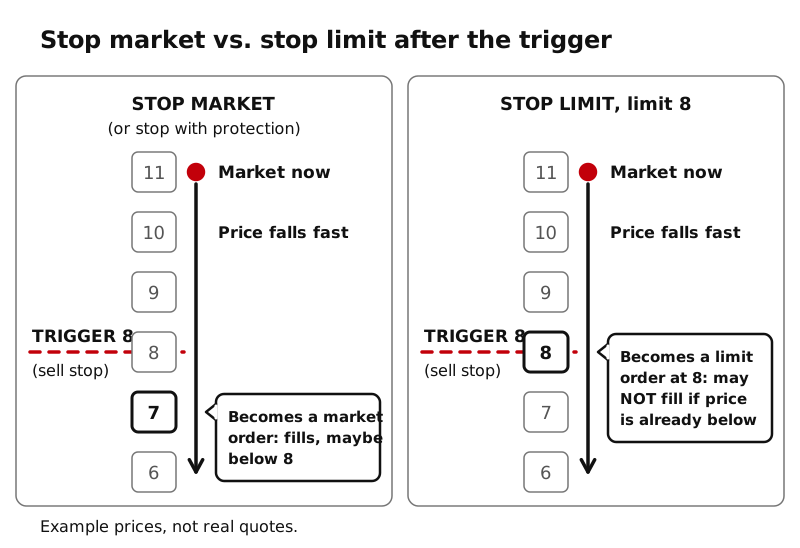
Stop market. When triggered, it becomes a market order. CME’s Trading Simulator guide describes its “stop” order this way. You are almost sure to get out, but the fill price is not guaranteed. The SEC makes the same point for stocks: the stop price is a trigger, not a guaranteed execution price, and the fill can be far from it.
Stop limit. You set two prices: the trigger and a limit. When triggered, it becomes a limit order, which fills only at the limit or better. You control the price, but if the market jumps past your limit, the order may not fill, and you may still be in the trade.
A worked example
Example prices, not real quotes, using CME’s own round numbers. The market is at 11. You are long and want out if price falls to 8.
- Sell stop limit, trigger 8, limit 8. A trade prints at 8, so your order becomes a limit order to sell at 8. If buyers are there, you are out at 8. If price drops straight to 6, your order stays resting at 8, unfilled, and you are still long.
- Sell stop with protection, trigger 8, 2 protection points. This is CME’s example. When 8 trades, the order tries to sell at 8 but can sell as low as 6. You are more likely to get out, and the protection stops it from selling below 6.
What CME Globex itself accepts
Here is a fact worth knowing early. CME’s reference list of CME Globex order types includes only two kinds of stop:
- Stop-limit, which goes on the book as a limit order when triggered.
- Stop with protection, which goes on the book as a market order that can only fill within a protection range around the trigger price.
A plain, unlimited stop market order is not on that list. Yet many trading platforms, including CME’s own Trading Simulator, show a button called “Stop” or “Stop Market.” Brokers and platforms may translate your order into an exchange order type, or hold it on their own systems and send it when triggered. Platforms differ. Ask your broker how its stop orders are handled.
What triggers a stop
On CME Globex, a stop is triggered by a trade at the trigger price; CME’s protection version triggers when the market trades at or through it. The SEC notes that for stocks, some brokers trigger stops off the last trade and others off quotes (the bid or ask). If your platform holds the stop itself, its rule might differ. Check.
Two more cautions from the SEC that apply to any stop: a brief, sharp move can trigger it and then reverse, and a stop that becomes a market order can fill well away from the trigger when few orders are waiting near that price.
Key ideas
- A stop waits off the book until a trade at the trigger price, then becomes a live order.
- Sell stops below the market, buy stops above it.
- Stop market: likely to fill, price not guaranteed. Stop limit: price controlled, fill not guaranteed.
- CME Globex accepts stop-limit and stop with protection. Platform labels and handling differ, so check your broker.